







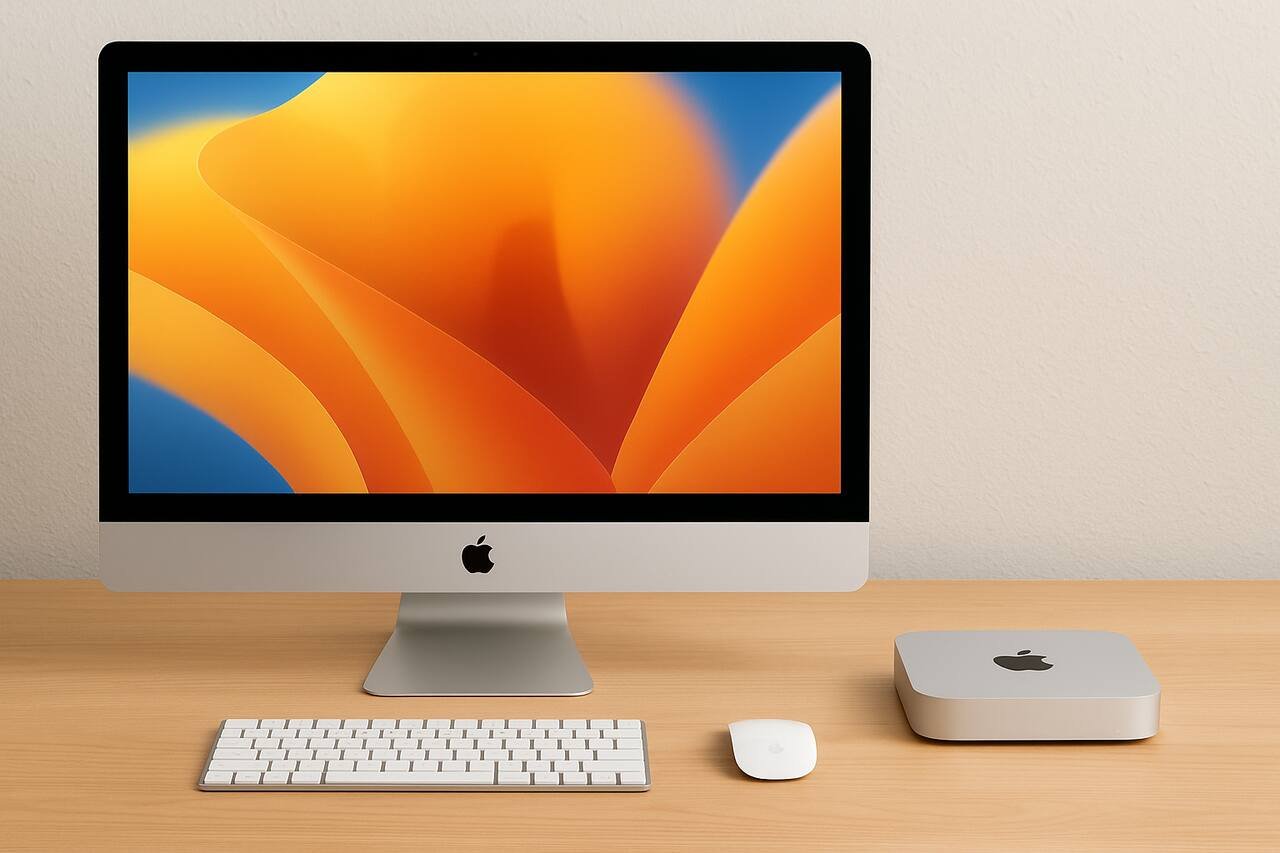
Understanding the comparison of iMac vs Mac Mini helps buyers choose a workstation that fits performance needs, workspace limitations, creative demands, and long-term upgrade planning. Both machines serve different purposes, and selecting the right one involves evaluating display needs, processing power, expandability, and how each device supports day-to-day tasks. This guide breaks down each important step to help you make a clear and confident decision.
Evaluate Your Workspace Setup
When comparing iMac vs Mac Mini, begin by looking at how much room you have and how flexible your desk arrangement needs to be. The iMac integrates the computer and display into one unit, making it ideal for uncluttered setups. The Mac Mini is compact and requires an external monitor, giving you more freedom to rearrange or pair multiple screens.
Choosing between these options depends heavily on how your desk environment supports additional hardware. The iMac’s single-unit footprint eliminates cable mess, while the Mac Mini thrives in modular setups where monitors, speakers, and mounts can be customized. If your workspace evolves frequently or you prefer a multi-monitor arrangement, the Mac Mini’s adaptability offers more control.
Your final decision should reflect how static or dynamic your workspace is. The iMac is perfect for fixed workstations that value simplicity. The Mac Mini fits users who expect to modify peripherals over time or place the computer away from the monitor for a cleaner workstation.
Compare Desk Space Requirements
The iMac occupies more vertical and horizontal space because of its built-in screen. Users with compact desks may find the 24-inch display overwhelming. On the other hand, the Mac Mini’s tiny enclosure easily fits under monitors, shelves, or behind displays.
Review Cable and Accessory Needs
The iMac keeps cables to a minimum since the display, speakers, and computing components are unified. The Mac Mini requires additional accessories including a monitor, speakers, and keyboard, so expect more cables unless using wireless devices.
Determine Your Performance Requirements
The difference in performance is a critical part of the iMac vs Mac Mini comparison. While both devices use Apple Silicon processors, the Mac Mini offers more configuration options and higher-tier chips that outperform the iMac. If your work involves graphic design, video editing, or software development, the Mac Mini provides more power at the upper end.
Performance considerations include CPU selection, GPU performance, RAM capacity, and how the computer handles sustained workloads. The iMac’s hardware is excellent for general productivity, light creative work, and professional tasks that do not push machine limits. However, users who require heavy parallel processing benefit from the Mac Mini’s broader processor lineup.
Before choosing, consider whether your tasks rely heavily on rendering, compiling, or multitasking. The Mac Mini offers room to scale higher, while the iMac delivers consistent performance suitable for everyday and mid-level creative workflows.
Analyze Chip Options and Processing Needs
The iMac typically offers fewer chip selections compared to the Mac Mini, which ranges from entry-level chips to advanced performance processors. The broader selection allows the Mac Mini to serve both casual home users and demanding professionals.
Account for Thermal and Sustained Performance
Mac Mini models have better thermal conditions due to their thicker chassis and dedicated ventilation. The iMac stays quiet but is thermally constrained because of its slim display housing.
Select the Ideal Display Configuration
Display requirements play a major role when examining iMac vs Mac Mini. With the iMac, the display is predetermined, color-calibrated, and built into the system. This benefits users who want a beautiful screen out of the box without extra setup. The Mac Mini requires an external monitor, which opens the door for a wide range of screen sizes, refresh rates, and panel technologies.
Creative professionals may prefer the Mac Mini’s ability to pair with 4K, 5K, or even 6K monitors for enhanced clarity. Casual users, students, and office workers may find the iMac’s built-in display more than adequate and visually stunning for everyday tasks.
Your decision should reflect whether you value convenience or customization. The iMac offers simplicity. The Mac Mini offers flexibility.
Compare Resolution and Color Accuracy
The iMac features a high-resolution Retina display with excellent color accuracy, ideal for graphic work and media consumption. The Mac Mini supports multiple monitor resolutions depending on the connected screens, including high-end options that exceed the iMac’s capabilities.
Consider Multi-Monitor Productivity
The Mac Mini allows multi-display setups with ease, supporting wide ultrawide monitors or dual-screen configurations. The iMac can support external monitors, but its primary screen cannot be replaced or upgraded.
Assess Portability and Placement Options
Portability is another essential factor in the iMac vs Mac Mini decision. While neither device is designed for travel, the Mac Mini is lightweight, compact, and easy to move between rooms, offices, or studios. This makes it a good choice for users who occasionally relocate or restructure their work areas.
The iMac is portable only in the sense that it can be carried, but its large display and delicate form make it harder to reposition. People who set up a workstation and rarely move it will not find this limiting, but users who need mobility within a building will appreciate the Mac Mini.
Evaluate how often your computer might need to move or sit in different environments. The Mac Mini provides unmatched placement versatility, while the iMac focuses on stationary reliability.
Explore Mounting and Storage Options
The Mac Mini can be mounted under desks, behind monitors, or on wall mounts. This frees desk space while keeping airflow intact. The iMac relies on its stand or optional VESA mount and must remain visible due to its integrated screen.
Examine Travel and On-Site Use
Professionals who perform on-location work may find the Mac Mini convenient because it pairs with existing monitors at studios or offices. The iMac is less practical for transport due to its size and glass display.
Review Your Budget and Long-Term Value
Budget considerations strongly influence the iMac vs Mac Mini comparison. The iMac is priced as an all-in-one solution, bundling the computer, display, speakers, and camera. The Mac Mini has a lower entry price, but users must purchase a monitor and audio equipment separately.
Over the long term, the Mac Mini may provide better value because the monitor can be replaced independently of the computer. With an iMac, upgrading the entire system requires purchasing a brand-new device even if the display still works perfectly.
Your financial planning should factor in total cost of ownership, immediate needs, and potential future upgrades. The Mac Mini typically yields greater longevity for people who upgrade in stages.
Compare Upfront Purchase Costs
The iMac includes premium components that raise the initial price, whereas the Mac Mini’s cost depends on the peripherals you select. This makes the Mac Mini more price-flexible for budget-conscious buyers.
Analyze Upgrade and Replacement Expenses
The Mac Mini lets users upgrade monitors, speakers, and accessories over time without replacing the computer. The iMac requires a full system replacement when display or performance needs increase.
Choose the Best Peripheral Compatibility Setup

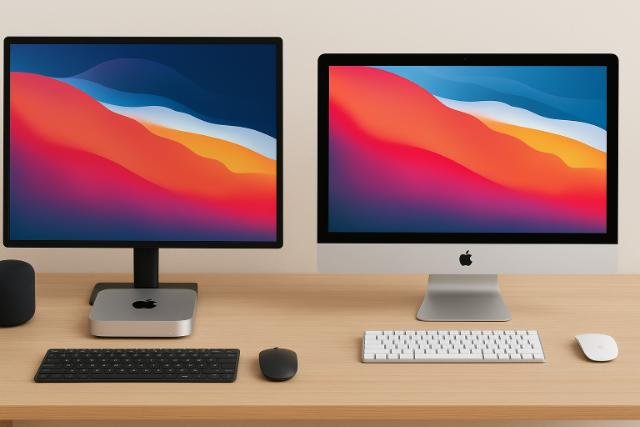
The Mac Mini excels in its compatibility with a vast range of peripherals. When comparing iMac vs Mac Mini, consider whether you already own external monitors, audio devices, or input tools. The Mac Mini integrates seamlessly with most third-party accessories.
The iMac offers a curated experience with built-in hardware. This reduces compatibility concerns but limits customization. People who want a ready-made ecosystem with minimal configuration benefit from the iMac’s design.
Your peripheral strategy should match your workflow. If you prefer tailored equipment, the Mac Mini is ideal. If you value simplicity, the iMac provides a complete hardware package.
Evaluate Monitor, Keyboard, and Mouse Pairings
The Mac Mini allows you to select any monitor size, resolution, or brand. You can also choose keyboard and mouse combinations that match your comfort and style. The iMac offers matched accessories designed to complement its aesthetics.
Review Audio and Webcam Options
The iMac includes high-quality built-in speakers and a front-facing camera. The Mac Mini requires external devices, allowing users to select professional-grade webcams and studio speakers if needed.
Finalize Your Ideal System Based on Workflow
Your workflow is the ultimate deciding factor in the iMac vs Mac Mini comparison. Creative professionals needing upgrade flexibility, greater performance options, and multi-monitor support tend to favor the Mac Mini. Users seeking elegance, simplicity, and a streamlined setup often choose the iMac.
Consider how you spend most of your time: editing media, writing, coding, browsing, or performing business tasks. Each activity benefits differently from screen quality, performance headroom, and accessory usage.
Aligning your system with your daily routine ensures the computer enhances your productivity rather than restricts it.
Match System Features to Daily Tasks
Writers, educators, and general users may find the iMac’s all-in-one design ideal. Professionals who rely on advanced tools will appreciate the Mac Mini’s higher-end configurations and monitor flexibility.
Plan for Future Expansion
If your future includes growing creative needs or multi-screen setups, the Mac Mini is the safer investment. The iMac suits people confident that their current needs will remain steady for years.
iMac vs Mac Mini Key Features
| Feature | iMac | Mac Mini |
| Display | Built-in Retina display | Requires external monitor |
| Performance Options | Limited | Wide range of chips |
| Portability | Low | High |
| Upgrade Path | Replace entire unit | Upgrade monitor independently |
| Price Range | Higher upfront | Flexible and scalable |
Display and Peripheral Comparison
| Category | iMac | Mac Mini |
| Speakers | Built-in | External required |
| Webcam | Integrated | External required |
| Monitor Flexibility | Fixed | Highly customizable |
| Multi-Monitor Support | Limited | Strong support |
Conclusion
Choosing between iMac vs Mac Mini depends on simplicity, flexibility, and long-term goals. The iMac is an elegant all-in-one machine ideal for streamlined workstations and everyday computing. The Mac Mini provides a modular path that supports different displays, more advanced performance tiers, and greater upgrade freedom. Both systems offer exceptional reliability and speed, but the best choice comes down to how you prefer to build your workspace, how much control you want over peripherals, and how your future needs may evolve.
Explore more insightful and valuable content on our blog journalingtechniques! Stay updated with helpful tips, expert advice, and in-depth articles that enhance your knowledge.
FAQ’s
The Mac Mini is better for video editing because it offers higher performance configurations and supports advanced external displays.
The iMac can support additional monitors, but it has more limitations compared to the Mac Mini, which handles multi-display setups with ease.
Yes, the Mac Mini has a lower entry price, though users must purchase a separate monitor and audio peripherals.
The iMac cannot be easily upgraded. Most components, including the display, are fixed.
Yes, both use Apple Silicon chips, but the Mac Mini offers a broader range of processor options.
The Mac Mini fits better in small workspaces because of its compact size and flexible placement options.


